Have you ever wondered exactly what happens once you request a new ROR record or suggest a change to an existing ROR record? In this blog post, we take you through all the steps involved in ROR’s open, community-driven process for making sure that the information in the Research Organization Registry is complete and accurate.
ROR’s community-driven process for maintaining high-quality information about research organizations in our registry means that anyone can request a new ROR record or suggest a change to an existing one. Our curatorial process for assessing these requests involves both human and automatic review, and all this review happens in the open so that anyone can follow along. Here’s a deeper dive into how that works.
Step 1: You submit a request
Requests come in two main forms: individual requests and bulk requests. In addition to processing requests, ROR curators also carry out independent quality assurance projects, which fall outside the scope of this post.
Individual requests are typically submitted through our public curation request form. The two most common actions are to add a new organization or change an existing record; however, you can also request to deprecate an existing ROR record, merge two or more ROR records, or split an existing ROR record into two or more records. Whatever the request type, the best requests have the most complete information possible, which speeds up processing time. There is a human behind every review, and so the more information is sent, the more context ROR curators have to process the request, and the less time they have to spend seeking further information.
For new record requests, it is particularly important to provide multiple DOIs or URLs for research publications that use the organization as an affiliation or that acknowledge the organization in some way, such as for funding, in order to meet ROR’s definition of what constitutes a “research organization.” For all other types of requests, providing a link for evidence that a change should be made, such as a name change announcement on the organization’s website, is also very helpful for faster processing.
If you are having difficulty submitting through our form, you can always create your own request directly on GitHub if you have an account. We have templates available for adding a new organization or modifying an existing record.
Bulk requests for larger sets of organizations can be submitted via email through a spreadsheet template. There are two spreadsheets available—one for adding new organizations and one for updating existing records—so please choose the correct spreadsheet for your requests or send us both spreadsheets if you have both new and update requests. Instructions for how to complete the spreadsheets are in the headers of each column.
Step 2: A GitHub issue is created for the request
Behind the scenes, your request is automatically converted into a GitHub issue. This means it’s immediately visible in our public curation updates tracker, where anyone can see requests and anyone with a GitHub account can comment. Because transparency is central to the ROR model, all requests and discussions are open by default. Personal information from the requester never gets published or shared. ROR currently receives approximately 2000 individual submissions per month in addition to bulk requests of various sizes. Processing for individual requests takes about four to six weeks, depending on complexity.
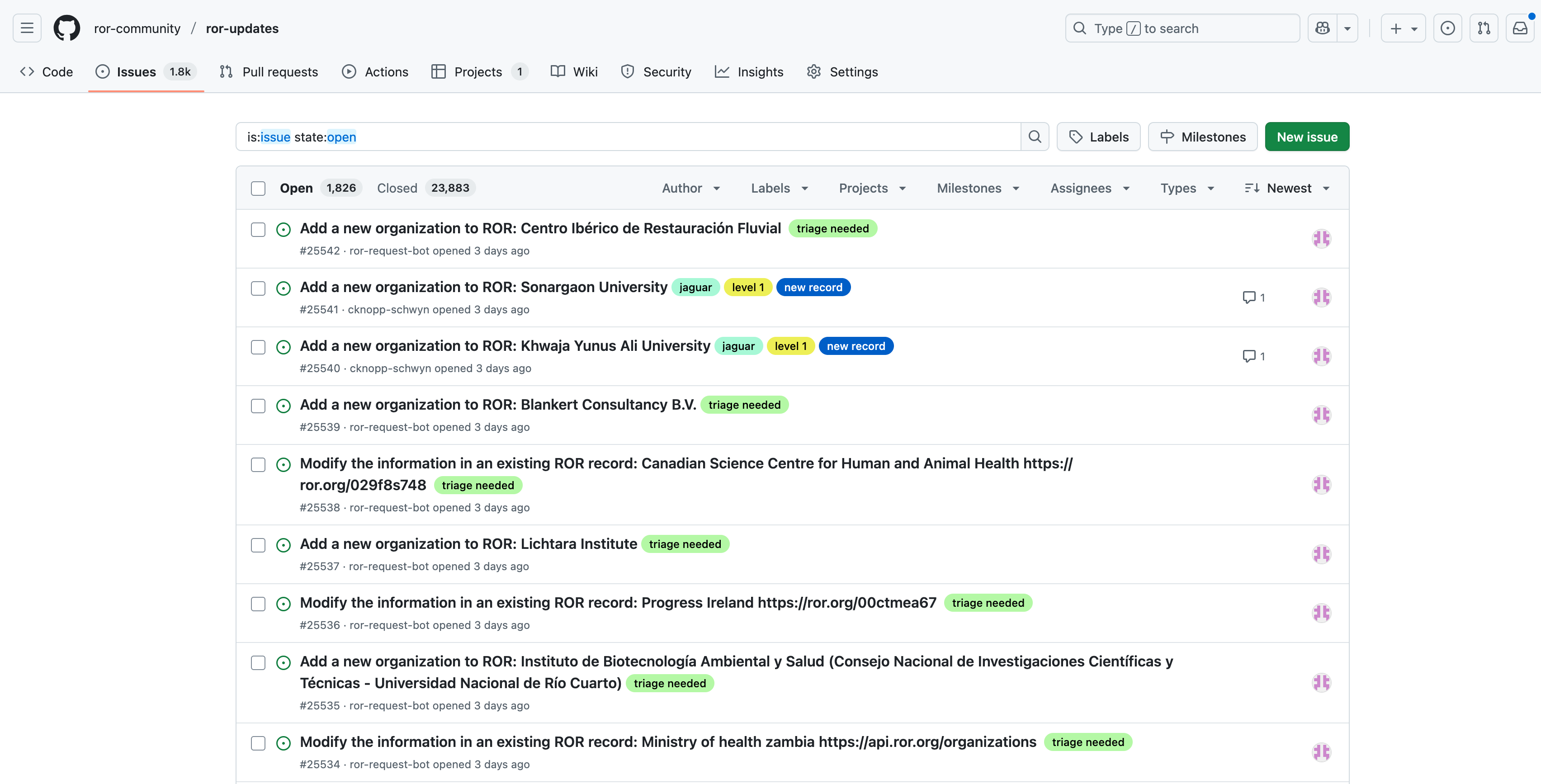
ROR’s public curation updates tracker on GitHub allows anyone to see requests for changes and additions to ROR.
For bulk requests, a single project issue is created, and when it is processed, each row in the spreadsheet is converted into individual sub-issues linked to the project. Because bulk requests range in size from tens to thousands of requests, they can take a longer time to process compared to individual requests.
You will receive an email confirmation with a link to your new issue on GitHub where you can follow along for next steps. If you have any additional context later, such as additional links to research or a correction to the form, please comment on your GitHub issue. Again, this requires a GitHub account, but they are free and easy to make. As always, you can also email support@ror.org if you have questions or additional information at any point in the process.
Step 3: Automatic tools do initial triage of the request
Next, ROR’s automated tools perform initial checks on the request. These are scripts and workflows we’ve developed that take the form of “bots” that you might see interacting with your GitHub issue. A ROR curation bot helps us format the human-submitted data in the request by deleting extra fields, fixing formatting so it’s ready to process, and adding language tags. You can see the changes this bot makes in a comment below the issue, where the red highlight with the minus (-) symbol indicates what’s been deleted and the green highlight with the plus (+) symbol indicates what’s been added.
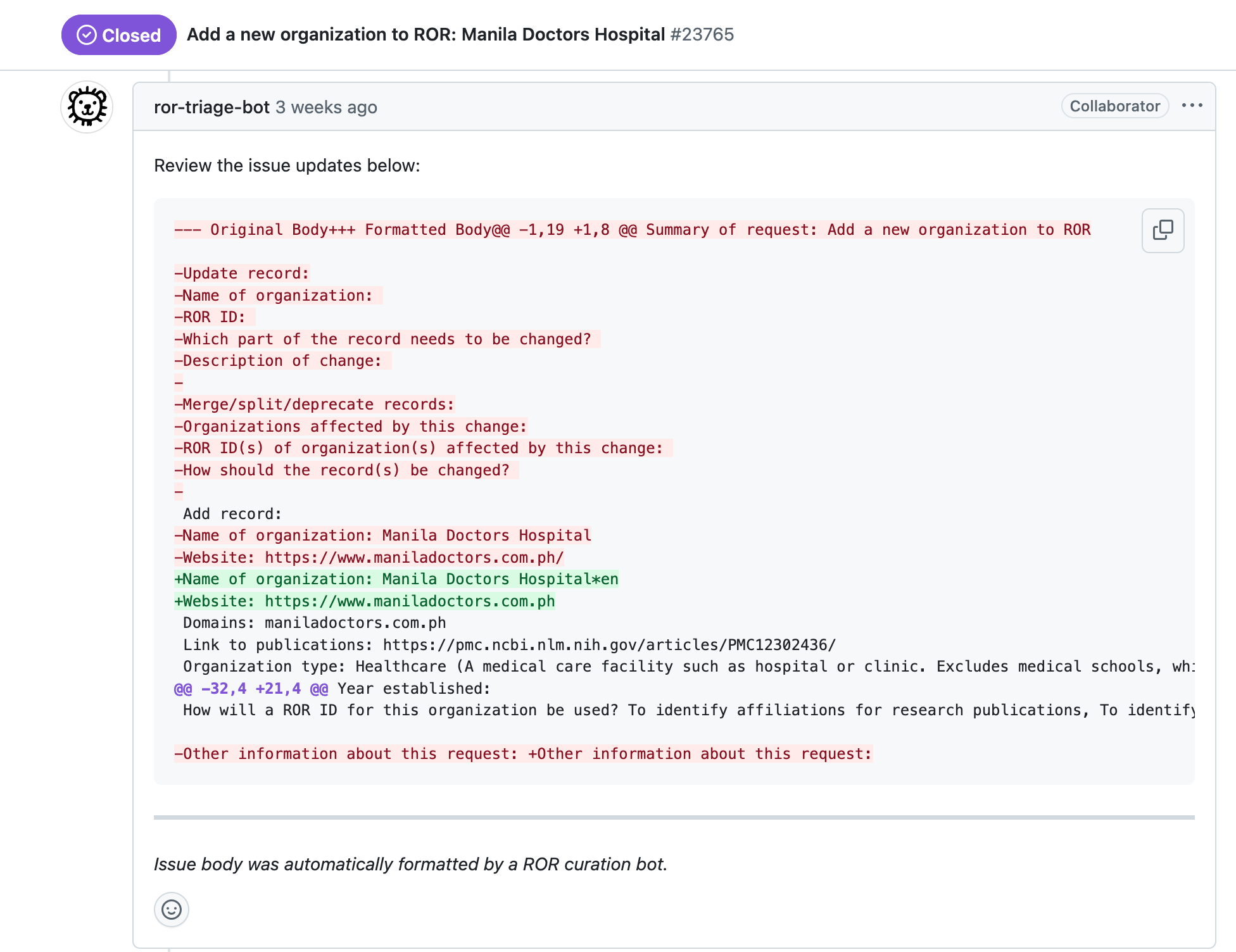
A ROR curation bot formats the data in a request to add Manila Doctors Hospital to ROR.
ROR curation bots also find information that helps with curator review and metadata quality. For example, you might see a bot find a GeoNames ID for the city and country provided, flag potential duplicates in ROR, check for additional identifiers like an ISNI or Wikidata ID, or look for research where the organization is used as an affiliation.
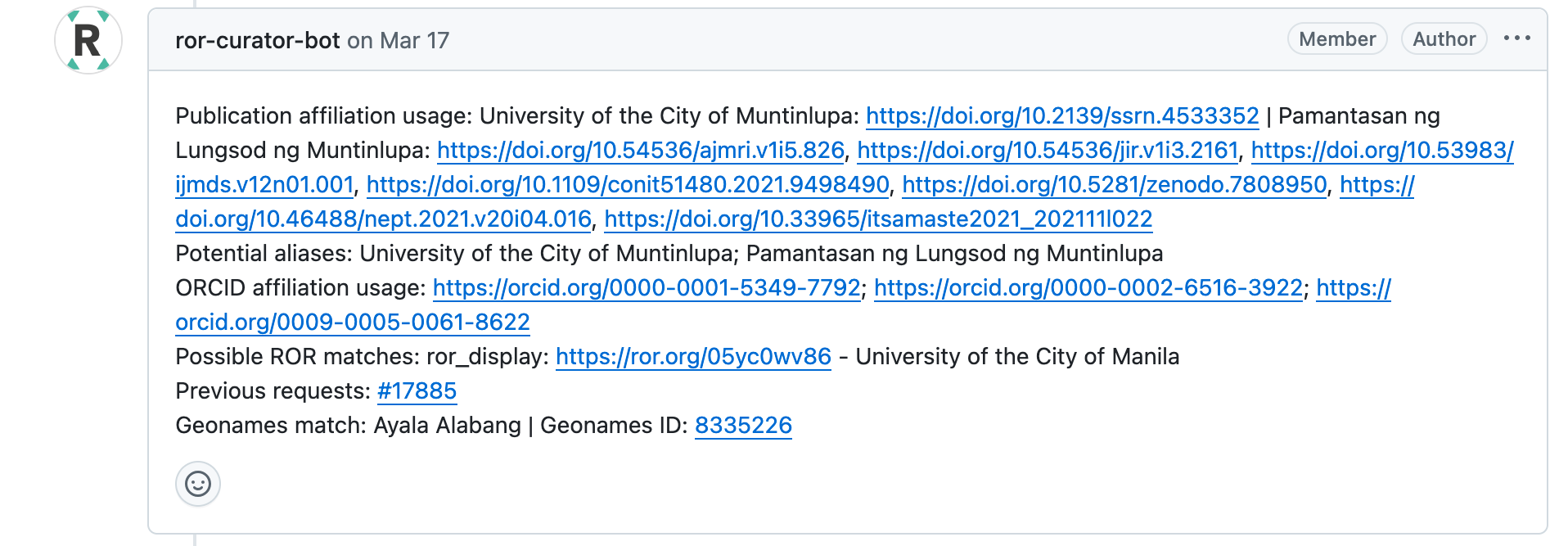
A ROR curation bot helps find additional information to help curators review a request to add University of the City of Muntinlupa to ROR.
These automated steps help ROR curators spend their time on meaningful review rather than on data clean-up. Our curators are always looking for ways to improve these processes by refining and building new curation bots and scripts, all of which can be found in our Curation Ops GitHub repository.
Step 4: Curators review the request
After automated triage, human curators step in to review the request in detail to ensure it is appropriate for ROR’s scope and consistent with other records. Metadata in each issue is reviewed and corrected to conform with ROR’s metadata policies and issue formatting.
ROR’s definition of “research organization” is broad by design: ROR strives to be a truly global registry, one that includes research organizations of many kinds from all over the world, so that these organizations can reliably be connected to the research outputs and activities they support. At the same time, ROR also upholds a high degree of consistency and integrity of the registry as a trusted and widely adopted source of institutional data. Therefore, for new organizations to be included in ROR, one of the most important criteria is whether the organization is cited in published research.
An organization should have clear reference to its activities in sources like contributor affiliations and funding acknowledgements in public research outputs to be considered a “research organization” that is in scope for ROR. If no links to research are provided in the request for a new ROR ID, if only links to self-published research are provided, if the organization is neither used as an affiliation nor acknowledged as a source of funding in open research repositories and knowledge graphs, and if no research is listed on the organization’s website, the request to add that organization to ROR will be declined. Of course, organizations may also reapply once ROR requirements are met.
In addition, since ROR IDs are persistent identifiers intended for long-term stability, ROR IDs identify organizations with long-term stability. Thus, ROR also requires that an organization is used as an affiliation in published research outputs by multiple people, indicating that it is not a one-person organization or consultancy that will not exist past the lifetime of a single person. Similarly, ROR expects instances of mention in multiple research outputs. Requests that have been declined can always be reconsidered if the requestor can provide evidence of multiple instances of research usage with multiple authors.
For changes to existing organizations, we verify the information against reliable public sources like the organization’s website, authority files, and national-level registries; we sometimes also reach out to the requester for clarification. The updates are then coded in the issue itself. You will see a string following “Update:” for changes to the record or “Related organizations:” for changes to the record relationships.
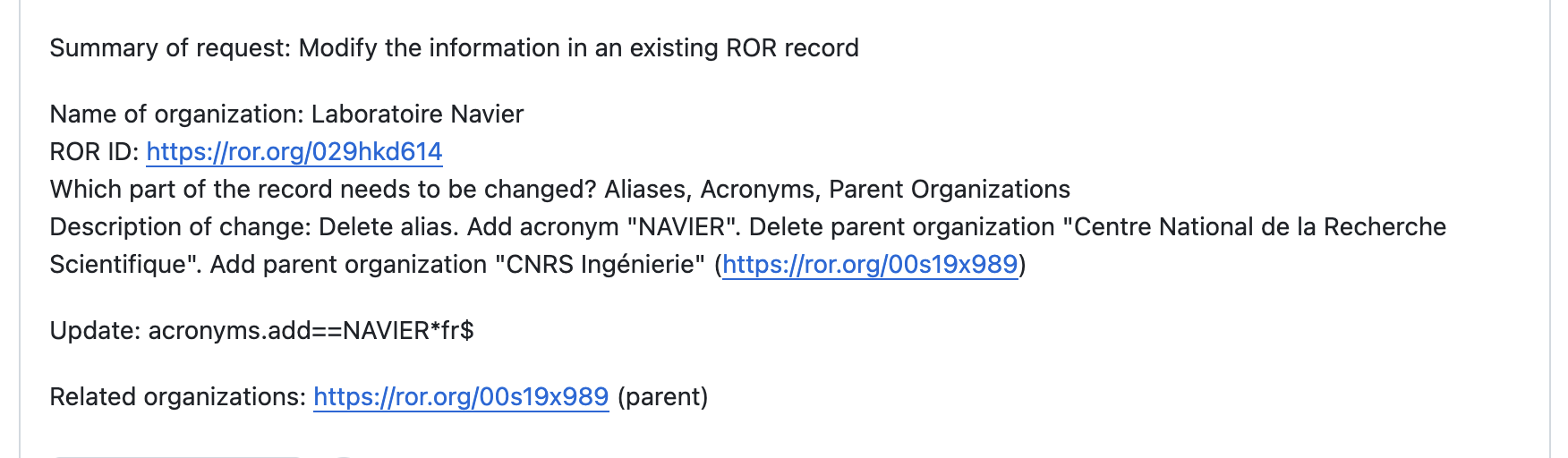
A request to update the existing ROR record for Laboratoire Navier gets a new acronym and a new parent relationship.
Any approved request will be moved to “Ready for sign-off / metadata QA” in our ROR Updates project board in GitHub. When a request is ambiguous or complex, it may be marked as “Second Review” or “Needs Discussion” and referred to the Curation Advisory Board for asynchronous review. The board also meets monthly to discuss tricky cases and broader policy questions.
Read more about our scope, criteria for inclusion, and curator workflows.
Step 5: Curators prepare the release
Every two to four weeks, all reviewed and approved requests are grouped into the next ROR data release. All metadata is double-checked using both automated scripts and manual review. This ensures that names, identifiers, and other fields are consistent across the registry and that everything aligns with ROR’s metadata policies. Additional checks are run to ensure there are no duplicates and that the metadata passes various quality and integrity validations.
Metadata from issues is then extracted programmatically to create new and updated records, turning the approved changes into JSON files that follow the ROR format. These files are then further refined in our release data pipeline, where we do things like update the date last modified and build new relationships between organizations that are again reviewed. Once the draft release passes those checks, we upload it to the staging environment to test it to make sure the new and updated records show up correctly in the API and search before moving everything into production.
Step 6: A new release of ROR is published
And then, hooray! A new release of ROR is published and becomes part of the open, global registry.
The release is then announced across our community channels, including on social media – LinkedIn, Bluesky, and Mastodon – and the ROR Technical Forum. After the release goes live, you’ll see a comment on your GitHub issue letting you know it’s been published.

A post-release comment is added to a request for a ROR ID for the Altamash Institute of Dental Medicine.
The best requests
Don’t forget that the best way to ensure faster processing of your request is to submit accurate, clean, and complete metadata! Please follow along on the journey of your own requests directly on GitHub to see updates, comments, and the decision-making process described here. We are always available to help with questions about requests at support@ror.org. In our next post in this series, we’ll go into more detail about how to submit an accurate, clean, and complete ROR request!
Your requests help make ROR great
Now, the next time you submit a new request or think about suggesting a change, you’ll know exactly what happens behind the scenes. By keeping curation open and collaborative while applying careful checks and rigorous processes, ROR ensures that the registry remains complete, accurate, and trusted by the entire research community.
Feed
Categories
Archives
Tags
- adoption
- annual-meeting
- api
- aps
- caltechdata
- cambridge-university-press
- clarivate
- clear-skies
- coki
- communication
- community
- cris
- cross-post
- crossref
- curation
- curvenote
- data
- datacite
- datasalon
- development
- digicorepro
- digital-science
- discovery
- dryad
- earthscope-consortium
- europe-pmc
- facilities
- fairsharing
- feedback
- figshare
- funders
- governance
- grei
- grid
- guest-post
- hhmi
- hierarchy
- highwire-press
- implementation
- integrations
- interviews
- inveniordm
- janeway
- jobs
- latin-america
- machine-learning
- matching
- metadata
- metadata-game-changers
- mps
- mvr
- nwo
- oareport
- oaworks
- open-access
- open-infrastructure
- openalex
- optica
- orcid
- osf
- persistent-identifiers
- pidapalooza
- pids
- posi
- prototype
- publishers
- publishing
- registry
- repositories
- requests
- research-integrity
- researchequals
- resources
- rockefeller-university-press
- rrid
- schema
- scholastica
- scilifelab
- silverchair
- skgs
- steering-group
- straininfo
- sustainability
- symplectic-elements
- team
- usdot
- web-of-science
- working-group
- zenodo