This is a test page
Hello, world! View the Markdown file for this page to see how this all works.
2 column layout
This is a 2 column layout with 2 unequal width columns of approximately 60% / 40%.
Lorem ipsum is placeholder text commonly used in the graphic, print, and publishing industries for previewing layouts and visual mockups.
Richard McClintock, a Latin scholar from Hampden-Sydney College, is credited with discovering the source behind the ubiquitous filler text. In seeing a sample of lorem ipsum, his interest was piqued by consectetur—a genuine, albeit rare, Latin word. Consulting a Latin dictionary led McClintock to a passage from De Finibus Bonorum et Malorum (“On the Extremes of Good and Evil”), a first-century B.C. text from the Roman philosopher Cicero.
Insert an image into the second column using Hugo’s built-in figure shortcode. Image © by Jeremy Pagden
Callout boxes
Use the callout shortcode for a callout box. You can make the box any one of the brand colors except raspbaerry by specifying the color in the shortcode: green, dark grey, orange, light grey, purple, or black. If you do not specify a color, the callout will be the default light grey.
By default, callout boxes have the info icon shown here. You can also set any icon from the Font Awesome library by specifying its name. If you do not want an icon, specify “no-icon” and your callout box will have full-width text. You can style text within a callout box using normal Markdown.
Lorem Ipsum is placeholder text. Richard McClintock, a Latin scholar from Hampden-Sydney College, is credited with discovering the source behind the ubiquitous filler text.Lorem Ipsum is placeholder text. Richard McClintock, a Latin scholar from Hampden-Sydney College, is credited with discovering the source behind the ubiquitous filler text.Lorem Ipsum is placeholder text. Richard McClintock, a Latin scholar from Hampden-Sydney College, is credited with discovering the source behind the ubiquitous filler text.Lorem Ipsum is placeholder text. Richard McClintock, a Latin scholar from Hampden-Sydney College, is credited with discovering the source behind the ubiquitous filler text.Lorem Ipsum is placeholder text. Richard McClintock, a Latin scholar from Hampden-Sydney College, is credited with discovering the source behind the ubiquitous filler text.Lorem Ipsum is placeholder text. Richard McClintock, a Latin scholar from Hampden-Sydney College, is credited with discovering the source behind the ubiquitous filler text.Buttons
Buttons work similarly to the callout boxes above. Wrap the text of your button in the button shortcode and specify the link in the shortcode itself. If no color is specified, the color will be green.
Centered content
You can center any block of content, including just a single button, using the centered shortcode.
Home page announcements
To add an announcement banner to the home page, edit the announcement_text and announcement_link values in /data/announcement/announcement.yaml and then make sure the announcement parameter is enabled in all of the site’s config files: localhost.toml, dev.toml, staging.toml, and live.toml. In the config files, set params.announcement to enable=true to make the purple announcement banner appear with the text and link from the announcement.yaml file.
Tables
| C1 | C2 | C3 | C4 | C5 | ROR.ORG |
|---|---|---|---|---|---|
| ROW | ROW | ROW | ROW | ROW | ROW |
| ROW | ROW | ROW | ROW | ROW | ROW |
| ROW | ROW | ROW | ROW | ROW | ROW |
| ROW | ROW | ROW | ROW | ROW | ROW |
| ROW | ROW | ROW | ROW | ROW | ROW |
| ROW | ROW | ROW | ROW | ROW | ROW |
| ROW | ROW | ROW | ROW | ROW | ROW |
| ROW | ROW | ROW | ROW | ROW | ROW |
| DATACITE.ORG | ROW | ROW | ROW | ROW | ROW |
| CROSSREF.ORG | ROW | ROW | ROW | ROW | ROW |
Headers
Level 1 headers are reserved for page titles.
Tables of contents are generated automatically from level 2 headers on a page by the toc.html partial layout. The table of contents appears at the top of all regular site pages excluding the blog and taxonomy pages such as blog categories and archives. Level 3 headers and below will not appear in tables of contents.
Anchor links next to all headers are generated automatically by a render hook on all regular pages excluding the blog and the taxonomy pages. The anchor link will not display for headers of level 4 or below, but it will still be present and will cause an “empty link” accessibility error if used. Therefore, it is best to use bold or strong text instead of level 4 headers.
Headers should never include links.
Header 3
Bold text / Header 4
Images
Image locations
Sitewide images should be stored in the directory /static/img and blog-specific images should be stored in the directory /static/img/blog/[blogpostname].
Thumbnail images
The ROR blog is optimized for square thumbnails on the blog list page and the home page (called with “thumb” in blog post front matter), but rectangular images share best on social media (called with “images” in blog post front matter). You can choose to use a square image as the thumbnail and a different, rectangular image as the featured image for social cards, or you can use the same recangular image file for both the thumbnail and the social sharing image.
The best size for square thumbnails is 300 x 300 and the best size for rectangular social sharing images is 1200 x 627.
Round avatar image for interviews
Use the class “round-figure” in the figure shortcode to generate a small round avatar of a person’s face from an image. The original image should be square and cropped as closely as possible.

Centered and shrunken image
Use the class “blog-figure” in the figure shortcode to center an image in a blog post and shrink it to 70% of the page width. Leave the class off if you want the image to be 100% width.
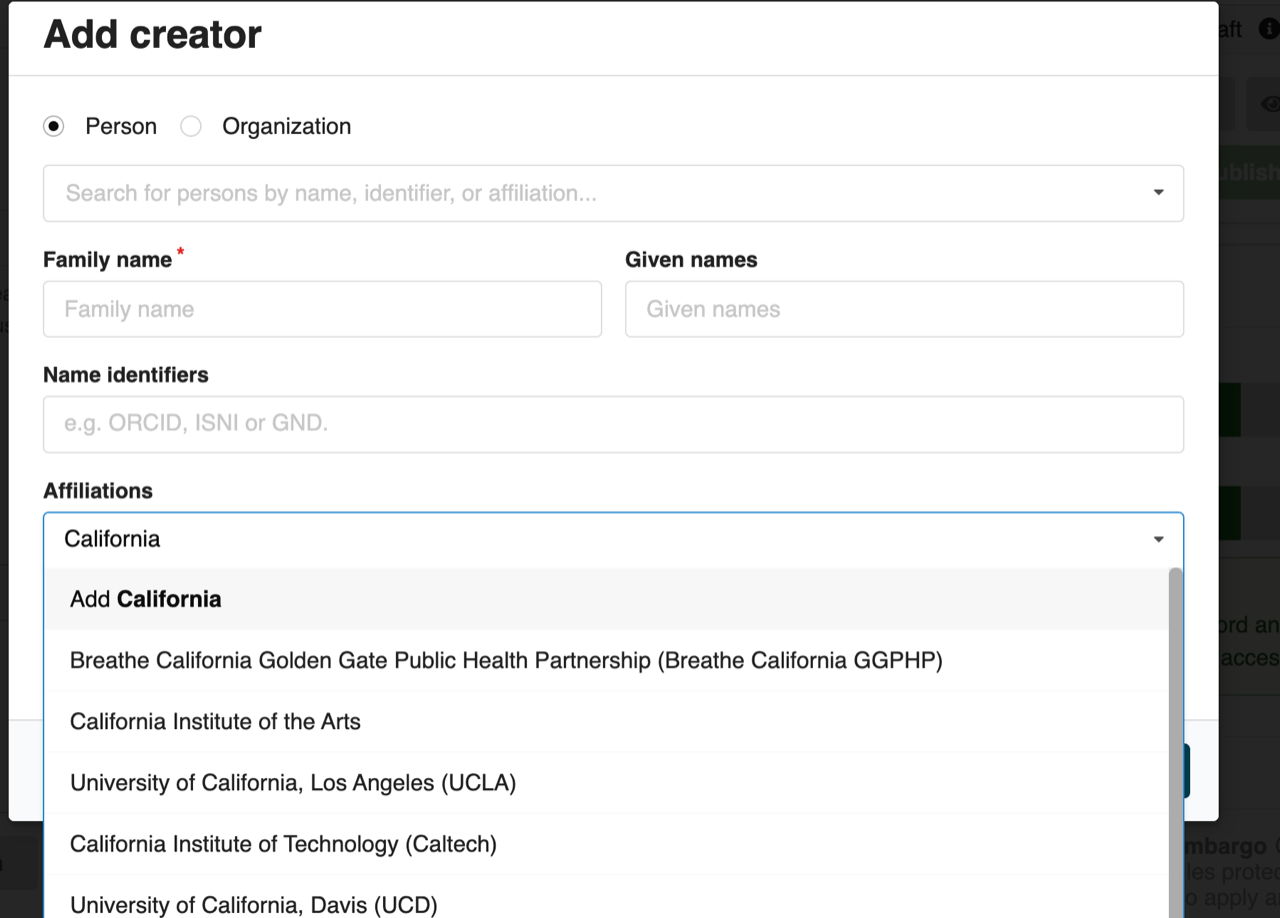
Entering an affiliation into CaltechDATA with InvenioRDM.
YouTube videos
YouTube videos can be embedded with the built-in Hugo youtube shortcode. Use the class “blog-video” in the youtube shortcode to center an embedded YouTube video and shrink it to 70% of the page width in a responsive container.
YouTube playlists can be embedded with the custom playlist shortcode.
Non-YouTube video content cannot be embedded.
iframes
Use the iframe shortcode to embed an iframe in a content page in a responsive container.